
Install an addon
Use the New UI to install and display addons. Try one of the ready-made examples if you’re new to addons.
- Download the addon and extract its ZIP.
- In Options → Addons, select Open folder and copy the extracted addon folder there.
- Return to the game, turn on the addon’s switch, and select OK. Its panels appear when you’re in the world.
To reopen a panel you closed, select Show panels next to the addon in Options. To move a panel, use Options → Interface → Layout → Rearrange.
To uninstall an addon, disable it in Options, select OK, and remove its folder.
Write your first addon
Give your addon its own folder. The folder name identifies the addon and uses up to 48 lowercase letters, digits, hyphens, or underscores. Place both required files directly inside it.
my-vitals/
├── addon.json
└── main.lua
Addon manifest
Write addon.json as UTF-8 JSON. The name, version, author, and url fields are required strings. The Addons list uses these values for the display name, version, author, and website link. Use an absolute HTTP or HTTPS URL.
{
  "name": "My Vitals",
  "version": "1.0.0",
  "author": "Your Name",
  "url": "https://example.com/my-vitals"
}
Lua entry point
Define a global main() in your UTF-8 script. The client calls it once per load. Register events there and use an ID to create or update a HUD panel.
function main()
    l2.on("tick", function()
        local me = l2.units.self()
        if me then
            local health = string.format("%d / %d HP", me.hp, me.max_hp)
            l2.ui.panel("vitals", "My vitals", health)
        end
    end)
end
Install your folder using the steps above. After editing your script, select Reload addons in Options to test the changes. Zip the whole folder when you share it. Keep the same folder name across releases to preserve players’ preferences.
API reference
Lifecycle
l2.version- The numeric API version. Currently
1. l2.has(feature)- Check for
"ui"controls or"settings"support in the client, or"combat"support on the connected server. l2.on(event, callback)- Register one callback per event in
main(). world.ready- Delivers your player snapshot once after the addon loads in the world, including after a reload.
tick- Runs about four times per second.
event.client_msis a monotonic client timestamp in milliseconds.
Show the active character on load
function main()
    if l2.version < 1 then return end
    l2.on("world.ready", function(me)
        if me then l2.ui.panel("session", "Character", me.name) end
    end)
end
Units and party
l2.units.self()andl2.units.target()- Get your own or your target’s unit snapshot. Returns
nilwhen unavailable. l2.units.by_id(id)- Look up a unit known to the client. Returns
nilfor unknown IDs. l2.units.party()- Array with self and party members. Returns an empty array when solo.
l2.units.nearby(kind, limit)- Get up to 32 known nearby units, nearest first. Use
"npc","player", or"all". Defaults to 16 NPCs. party.changed- Delivers the current party array when membership changes.
Unit tables include id, name, and kind. Other fields can include level, class_id, hp, max_hp, mp, max_mp, cp, max_cp, leader, attackable, dead, and distance in Interlude world units. Unknown fields are nil.
Show the nearest known NPC
function main()
    l2.on("tick", function()
        local nearest = l2.units.nearby("npc", 1)[1]
        l2.ui.panel("nearby", "Nearby NPC", nearest and nearest.name or "None nearby")
    end)
end
Skills and casting
l2.skill_name(id)- Get a display name from the client’s skill table.
l2.cooldown(skill_id)- Get your cooldown’s
remainingandtotalin seconds, ornilif the timer is unknown. cast.started- Delivers
source,target,skill,level,cast_ms, andreuse_msfor a visible cast. cast.canceled- Delivers
sourcewhen a visible cast is interrupted.
Track the last skill you cast
local skill

function main()
    l2.on("cast.started", function(cast)
        local me = l2.units.self()
        if me and cast.source == me.id then skill = cast.skill end
    end)
    l2.on("tick", function()
        if not skill then return end
        local reuse = l2.cooldown(skill)
        local time = reuse and string.format("%.1f s", reuse.remaining) or "Timer unavailable"
        l2.ui.panel("reuse", "Skill cooldown", l2.skill_name(skill) .. " · " .. time)
    end)
end
Combat feed
l2.has("combat")- Returns whether the connected L2G server supports the combat feed.
combat.batch- Delivers confirmed combat results for you and visible party members in the same instance. Each batch contains
sequence,overflow, and arecordsarray.
Records contain kind (damage, heal, or miss), actor IDs source, target, and owner, a skill ID, applied hp and cp amounts, and server_ms. Zero indicates an unavailable source, owner, or skill ID. The flags critical, periodic, reflected, and transferred identify those outcomes when available. Treat totals as incomplete after an overflow. Coverage depends on the server build.
Total your character’s damage
local damage, incomplete = 0, false

function main()
    l2.on("combat.batch", function(batch)
        incomplete = incomplete or batch.overflow
        local me = l2.units.self()
        if not me then return end
        for _, event in ipairs(batch.records) do
            if event.kind == "damage" and event.source == me.id then
                damage = damage + event.hp + event.cp
            end
        end
    end)
    l2.on("tick", function()
        local text = "Waiting for a compatible combat feed."
        if l2.has("combat") then
            text = string.format("%.1f%s", damage, incomplete and " (incomplete)" or "")
        end
        l2.ui.panel("damage", "My damage", text)
    end)
end
HUD panels and controls
l2.ui.panel(id, title, text)- Create a panel or update its title and body. New panels open automatically. Updates respect the existing open or closed state.
l2.ui.open(id),l2.ui.close(id),l2.ui.is_open(id)- Show or hide an existing panel. Query its open state with
is_open, which returnsfalsefor an unknown panel. In Legacy UI the logical state is kept for the next switch to New UI. l2.ui.remove(panel, id)- Remove a widget. Returns
trueif a widget was removed. Remove a widget before reusing its ID for another type.
See UI elements for the calls and in-client previews for each control.
Each addon can create up to three panels with 12 widgets each. IDs use up to 48 lowercase letters, digits, hyphens, or underscores. Titles allow 52 characters and panel body text allows 840. Button and checkbox captions, dropdown options, and input placeholders allow 80 characters.
UI events
ui.openedandui.closed- Deliver
event.panelwhen a panel is first created or its open state changes. Register before creating the panel to receive its first open event. ui.clicked- Delivers
event.panelandevent.widgetwhen the player presses a button. ui.changed- Also delivers
event.value. It is a boolean for a checkbox or a one-based index for a dropdown. ui.submitted- Delivers the panel ID, widget ID, and submitted text in
event.value.
Setting a control’s value from Lua applies the update without emitting a user change event.
Make an interactive progress counter
local count = 0

function main()
    if not l2.has("ui") then return end
    l2.on("ui.clicked", function(event)
        if event.panel == "counter" and event.widget == "add" then
            count = math.min(count + 1, 5)
            l2.ui.progress("counter", "progress", count, 5)
        end
    end)
    l2.ui.panel("counter", "Progress counter", "")
    l2.ui.button("counter", "add", "Add one")
    l2.ui.progress("counter", "progress", count, 5)
end
UI elements
These previews come from the L2Godot client. Use the same panel and widget IDs to update existing controls.
Panel
l2.ui.panel(id, title, text)
A movable container with a title, body, and close button. Create it before adding widgets.
l2.ui.panel("tracker", "Goal tracker", "Track a personal goal.")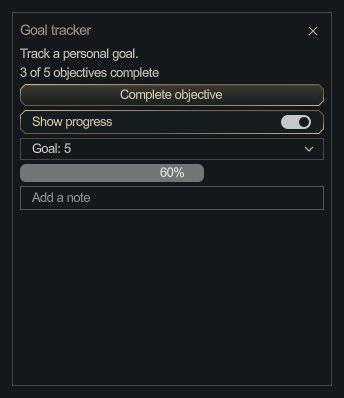
Label
l2.ui.label(panel, id, text)
Display up to 256 characters of text.
l2.ui.label("tracker", "status", "3 of 5 objectives complete")
Button
l2.ui.button(panel, id, text)
A press sends ui.clicked.
l2.ui.button("tracker", "complete", "Complete objective")
Checkbox
l2.ui.checkbox(panel, id, text, checked)
Pass true or false for the checked state. User changes send that boolean in ui.changed.
l2.ui.checkbox("tracker", "show-progress", "Show progress", true)
Dropdown
l2.ui.dropdown(panel, id, options, selected)
Supply 1 to 16 options. The selected index starts at 1. A new selection sends ui.changed.
l2.ui.dropdown("tracker", "goal", {"Goal: 5", "Goal: 10", "Goal: 20"}, 1)
Progress bar
l2.ui.progress(panel, id, value, maximum)
Use finite numbers and a positive maximum. The value is clamped to the bar’s range.
l2.ui.progress("tracker", "progress", 3, 5)
Text field
l2.ui.input(panel, id, text, placeholder)
Accepts up to 128 characters. The placeholder is optional. Enter sends the text in ui.submitted.
l2.ui.input("tracker", "note", "", "Add a note")
Saved settings
l2.settings.get(key, default)- Get a saved value. Returns the optional default or
nilwhen absent. l2.settings.set(key, value)- Save a boolean, finite number, or string up to 256 characters. Pass
nilto remove the key.
Each addon has up to 32 settings. Keys use the same naming rules as widget IDs. Changes are immediately available to the script and saved locally about once per second. Settings are keyed to the addon folder and survive reloads, client restarts, and upgrades that keep the same folder name.
Remember a checkbox across sessions
function main()
    if not l2.has("settings") or not l2.has("ui") then return end
    l2.on("ui.changed", function(event)
        if event.panel == "prefs" and event.widget == "details" then
            l2.settings.set("show-details", event.value)
        end
    end)
    l2.ui.panel("prefs", "Preferences", "")
    l2.ui.checkbox("prefs", "details", "Show details", l2.settings.get("show-details", true))
end
Examples
Panel Demo
Use a button, checkbox, dropdown, and text field to track a small goal. The demo saves its preferences and runs with the client UI API.
Download Panel Demo ZIPCombat Meter
See damage and healing totals for you and your party. Start fighting after you enter the world to see your totals. This addon requires a server that supports the L2Godot combat feed.
Download Combat Meter ZIPSecurity
Addons run inside the game with restricted access. An addon can use supported game data, show its own panels, and save its own settings. Scripts cannot make network requests, open files on your computer, or run system commands. Enable addons from sources you trust.
Addon authors must distribute Lua source code in main.lua. The client blocks Lua’s file and module loaders, precompiled bytecode, and access to .NET objects. It also limits Lua instructions and API calls per callback.
Limits and troubleshooting
If an addon is missing from the list, check that you copied the extracted folder into the Addons folder. If it appears disabled with an error, check that addon.json and main.lua are directly inside that addon’s folder.
Up to eight addons can run at once. For addon authors, the limits are 64 KB for main.lua and 8 KB for addon.json. The Addons list displays script errors.